AI and LLMs
Two ways an agent works with bb: it runs the CLI, or it connects to the MCP
server the CLI ships.
The MCP server
bb ai mcp serve speaks the Model Context Protocol over stdio, so an IDE or
agent framework calls typed tools instead of parsing command output. It offers
the tools that read, and with --allow-writes the ones that change Bitbucket
too; your client decides whether a call runs, as it does for its own tools. With
--elicitation-opt-in, the ones that change whether or when a
pull request merges, and creating a tag, also ask you to confirm each call in
the client before they run, and a client that cannot show that confirmation
cannot use them.
Pull requests, their diffs and open threads, files and commits are also resources you can attach in the client, and prompts such as "review a pull request" bring them along. The client completes their project, repository, pull request, path and ref as you type. bb reads them with its own credentials, so the client never contacts Bitbucket.
In a client that renders MCP Apps, such as Claude Desktop, VS Code or Goose, the agent answers with the pull request itself, a list of pull requests or a diff, right in the chat: views in your agent.
MCP Reference lists every tool, which of them write and which ask, and every resource and prompt.
Start it confined to the project the agent works in. Unconfined, it reaches every repository your token can read, and an agent misled by what it reads can copy a file from one of them into a pull request others read:
bb ai mcp serve --project PLAT
Wire it into a client by giving it that command. With no credential in the
entry, it uses the one bb auth login stored; for a token of the agent's own,
name a configuration file it logged in to, which keeps the secret out of the
client's file:
{
  "mcpServers": {
    "bitbucket": {
      "command": "bb",
      "args": ["ai", "mcp", "serve", "--project", "PLAT"],
      "env": { "BB_CONFIG_PATH": "/home/alice/.config/bb/agent.yaml" }
    }
  }
}
Set Up the MCP Server in Your Client has the entry for Claude Code, Claude Desktop, Cursor and VS Code, and how to make that file.
The server offers only the tools that read until you let it write. Five flags decide what it can reach:
| Flag | Effect |
|---|---|
--allow-writes |
Expose the tools that change Bitbucket too: create and update pull requests, comment, merge, tag. mcp_allow_writes: true in your configuration file does the same |
--project, --repo |
Confine the server to one project or repository; calls aimed elsewhere are refused |
--audit-file |
Append a JSON Lines record per tool call, to a path or to stderr |
--ai-disclosure=false |
Leave out the line saying an AI agent wrote a comment, description or tag message. The server then offers no tool that publishes such text under your name at once. mcp_ai_disclosure: false in your configuration file does the same |
The strongest limit is not a flag: a read-only personal access token in
BITBUCKET_TOKEN makes every write fail at the server regardless of which tools
are exposed. MCP Server Governance
covers scoping, token restriction and mandating an audit trail by policy.
Tools and views
The server gives an agent two kinds of thing, for different readers:
- Tools answer the agent. Each returns data the model reads: a pull request, a diff, a file, the result of a comment or a merge. They work in every client, a terminal agent included, and they are how an agent does its work, with you or on its own.
- Views are for you. The
showtool puts what the agent found in front of you, drawn in the chat by a client that renders MCP Apps. Its answer tells the agent only what it showed; the agent reads with the other tools.
| You want | The agent |
|---|---|
| An answer, a summary or a change made | Uses the tools and answers in words |
| A pull request in front of you, kept current as builds finish and reviews arrive | Shows its card |
| To see what needs your attention | Shows a list of pull requests |
| To review changes you have not checked out | Shows the diff |
| A pull request opened | Creates it with create_pull_request, filling in what you left to it |
| A say in a pull request's description or reviewers before it exists | Shows the form |
| Work done on its own: a scheduled, background or batch task | Uses the tools, and shows nothing |
The server tells agents the same: show is for a person who is there to see
it, once an answer is ready, and never for an agent working on its own. A pull
request you ask for is opened; the form is for when you want a say in it first.
A button in a view is not a link into Bitbucket but a call of the tools the
agent uses, through your client: Reply calls add_pr_comment, which adds the
reply to your review, Approve calls prepare_pr_review, which links to that
review in Bitbucket for you to publish, Create calls create_pull_request. How views work
shows the whole path.
Views in your agent
Ask about a pull request, and in a client that renders MCP Apps the answer comes
with the pull request itself, laid out as Bitbucket lays it out. There is
nothing to turn on: the model calls the show tool once it has found what you
asked about. A terminal client, such as Claude Code, shows the plain answer, and
--exclude show turns views off.
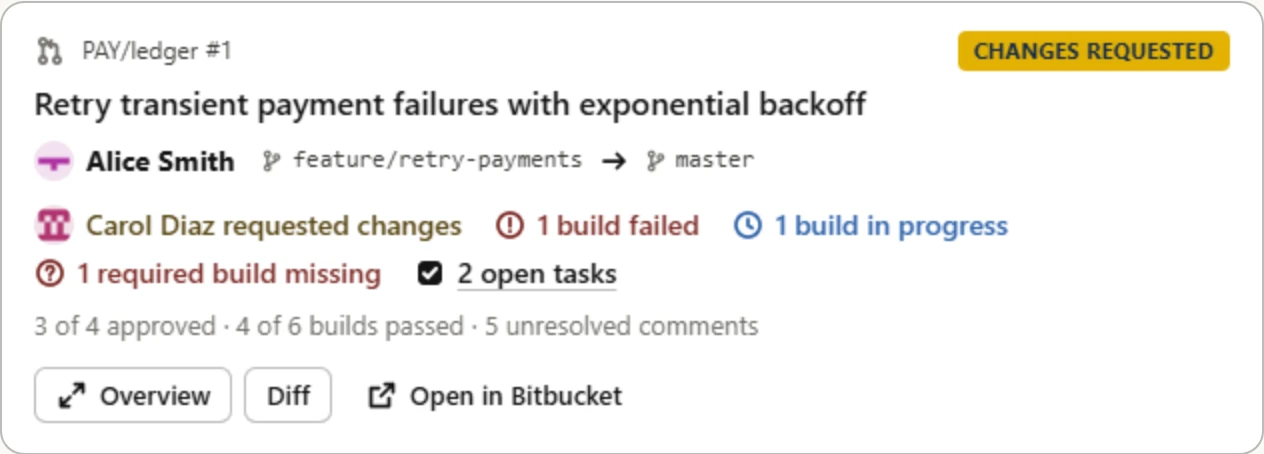
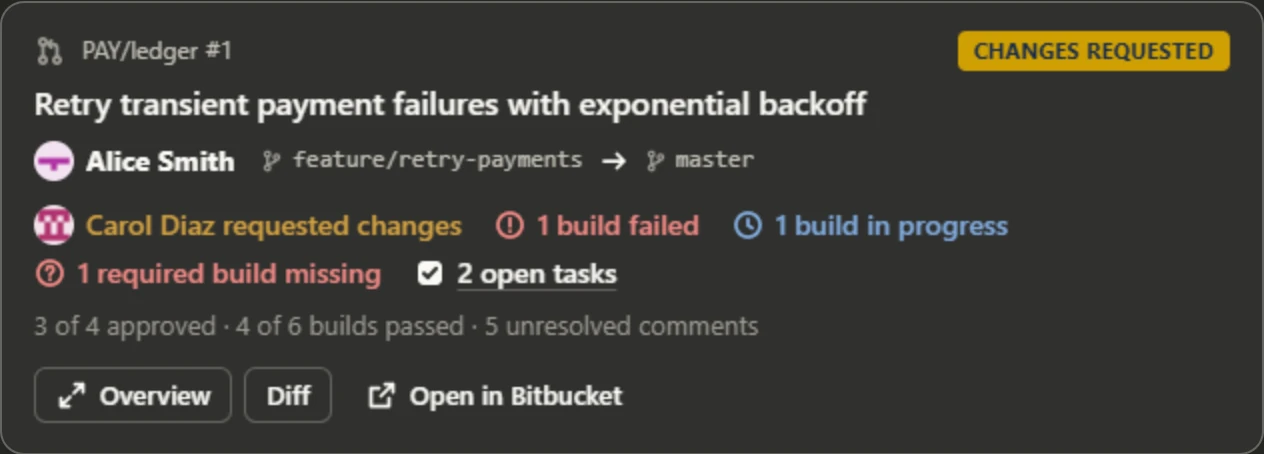
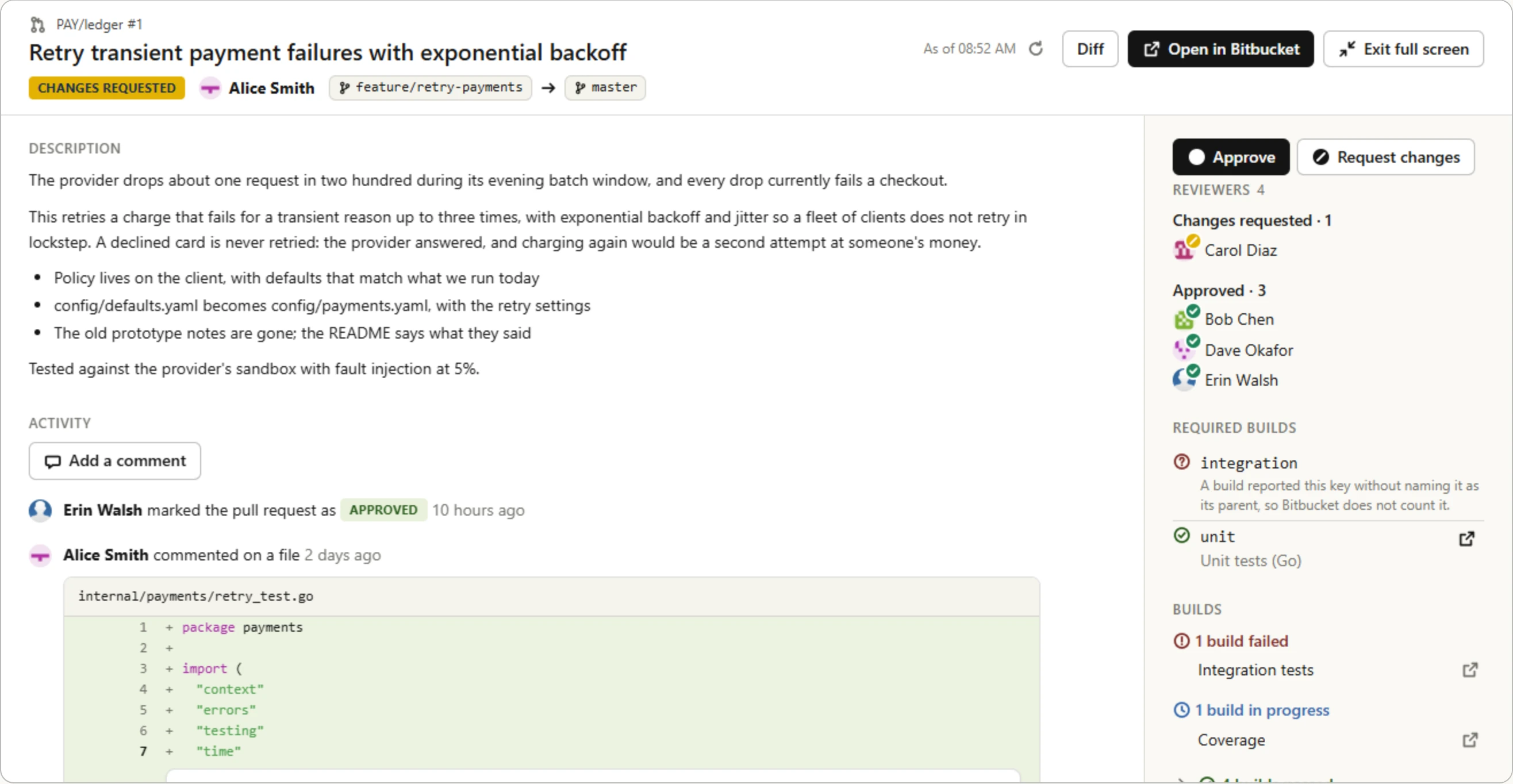
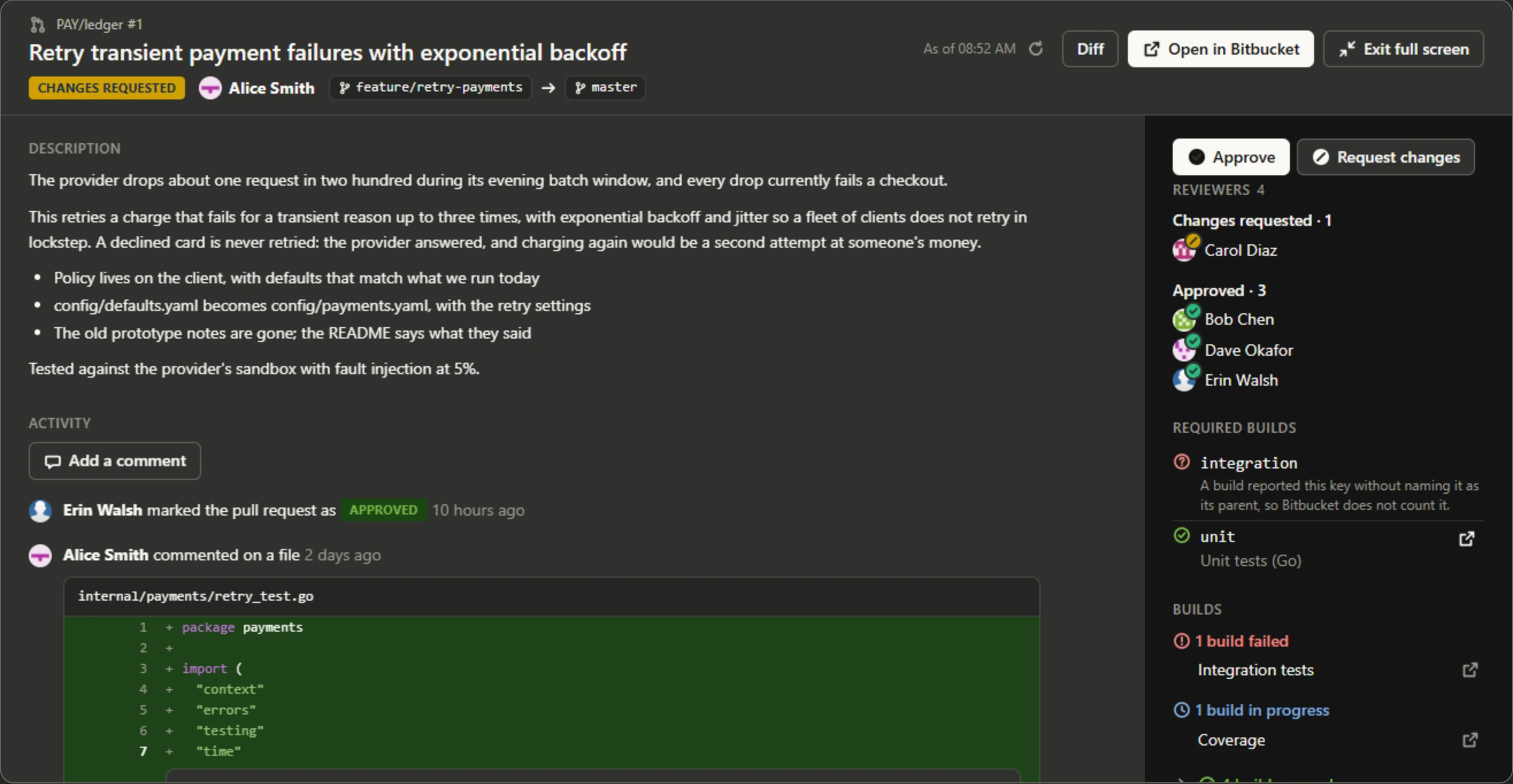
The card puts what asks something of someone on one line: who requested changes, a conflict, failed and running builds, required builds that have not run, open tasks. The counts under it are Bitbucket's, however many reviewers and builds there are. Overview opens the rest, fullscreen where the client has it and opened out in place where it does not: the description as Bitbucket formats it, and under it the activity as Bitbucket's overview lists it, newest first: who approved or requested changes, pushed or merged, and every comment, one on a line with the lines of the diff it is on. Beside them are the reviewers by their decision, the builds the target branch requires before it merges, and every build by its state. Reply to a comment, or comment on the pull request, where it is; the count of open tasks opens the overview at them. Approve and Request changes, in the overview and over the diff, say where your review waits and link to it: you publish it in Bitbucket with Finish review. A comment or reply you send from a view goes into that review, which only you see until then.
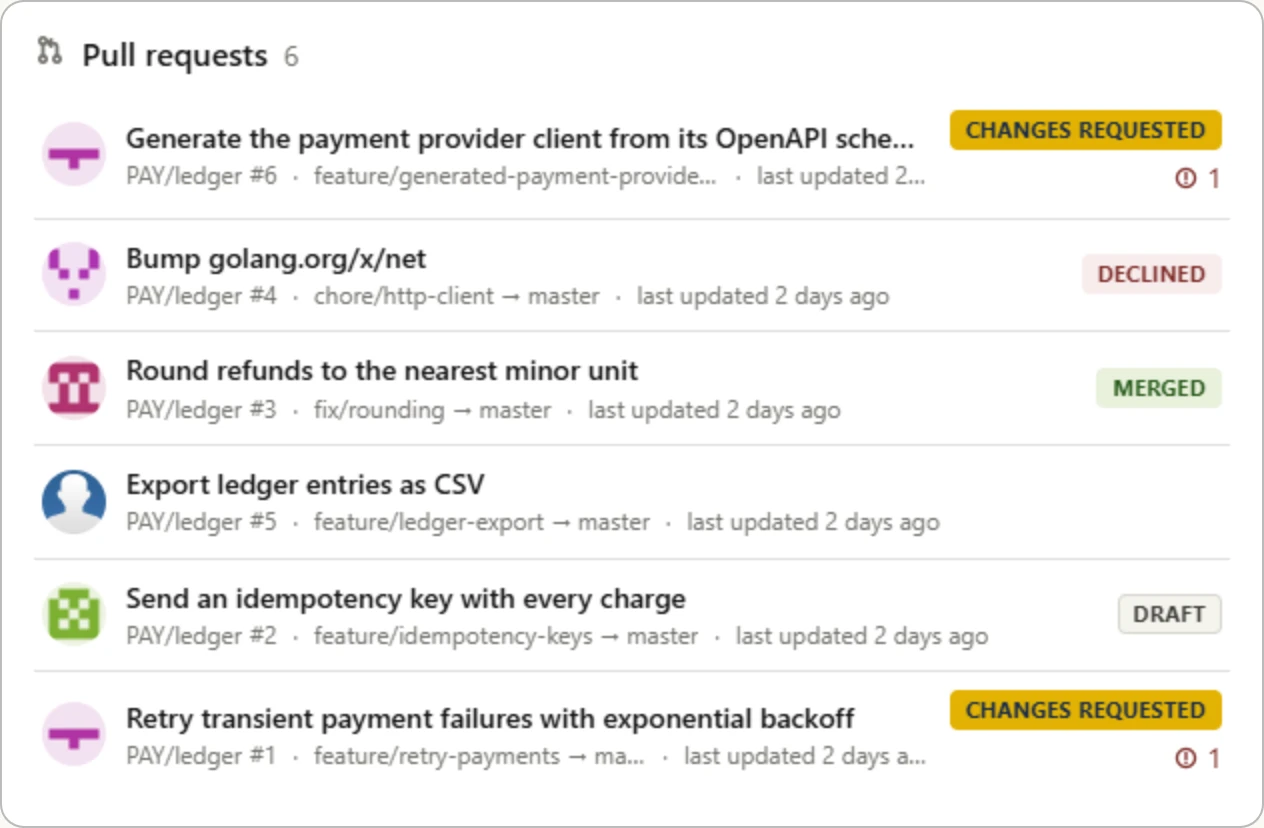
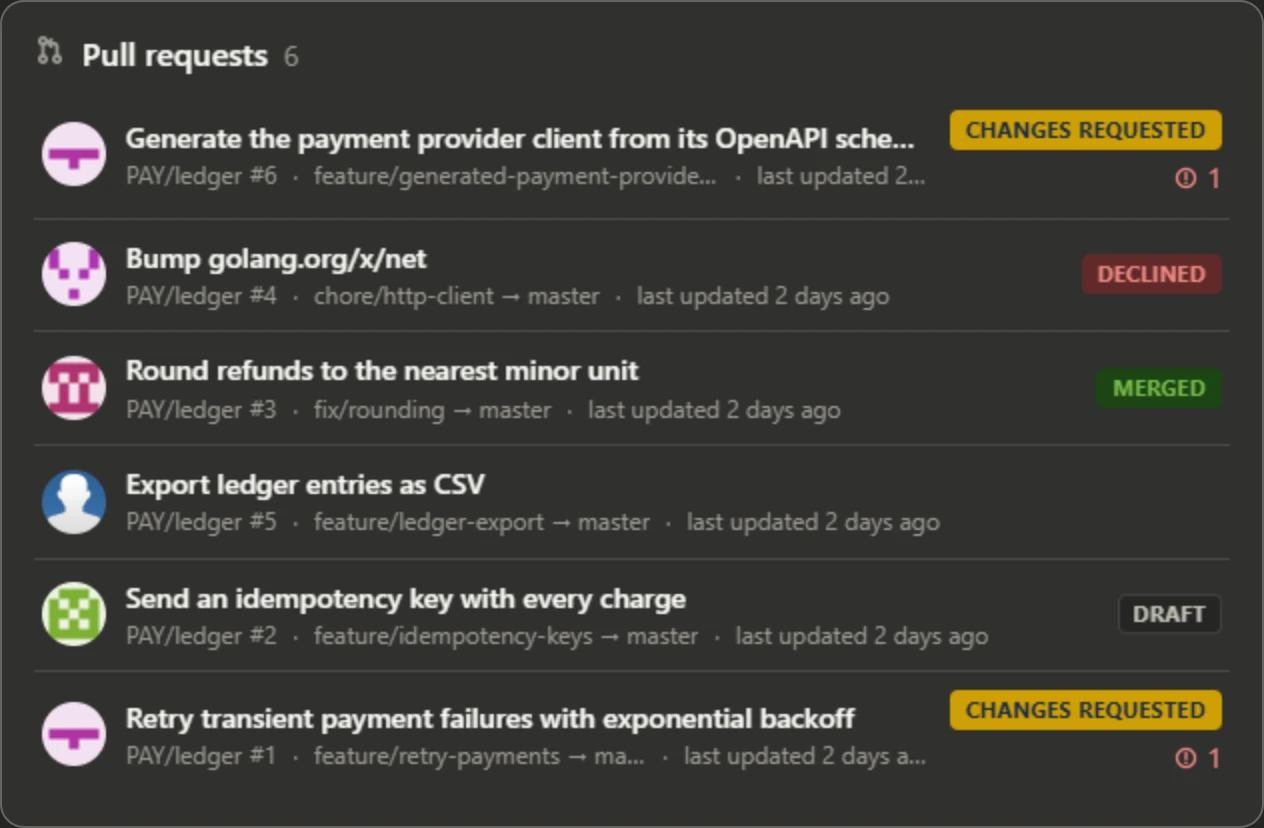
A list flags only what needs attention in each pull request: a request for changes, a draft, failed builds. A row opens its card in the same view. Fullscreen adds Bitbucket's dashboard columns and filters, and asks for the pull requests in another state or role.
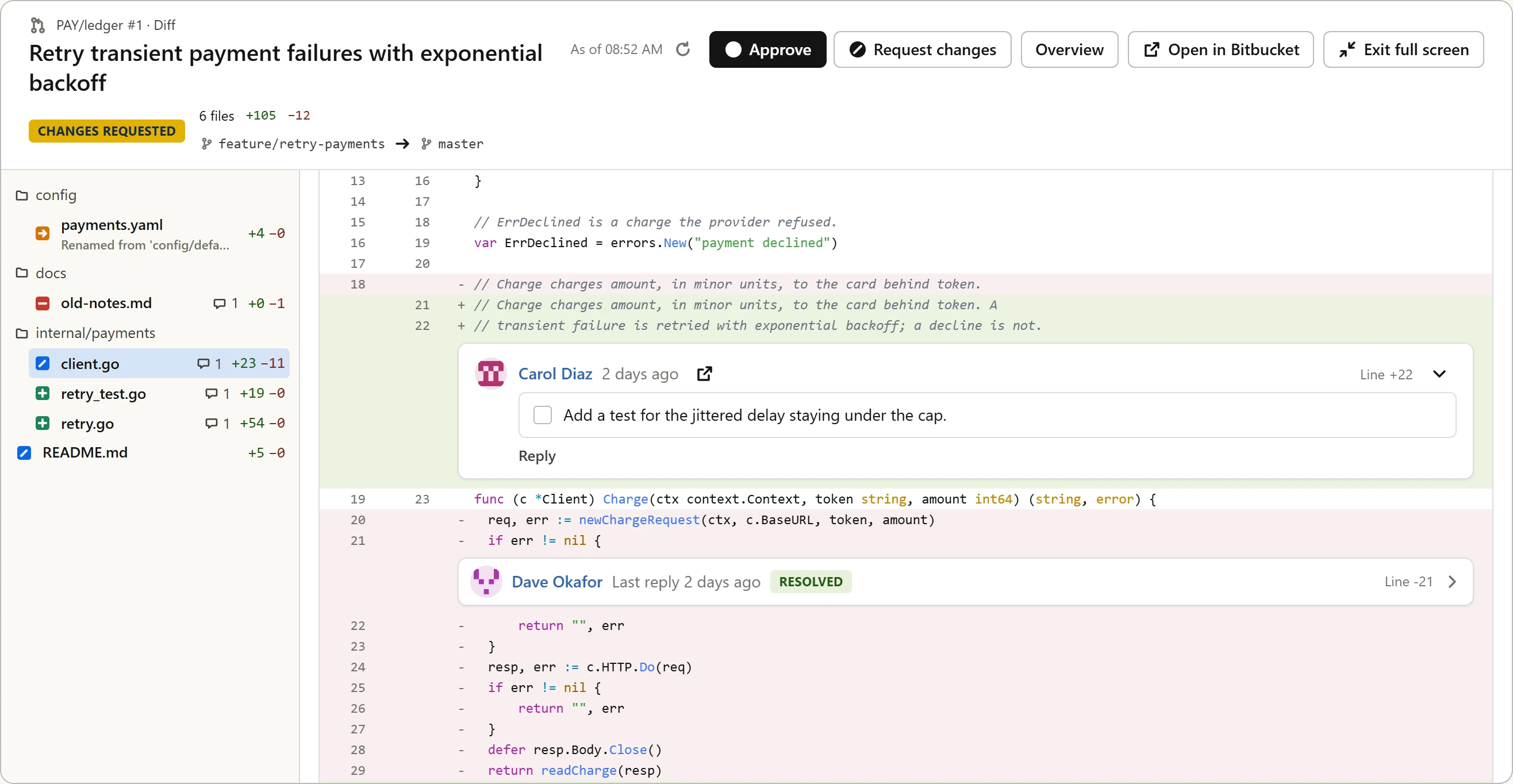
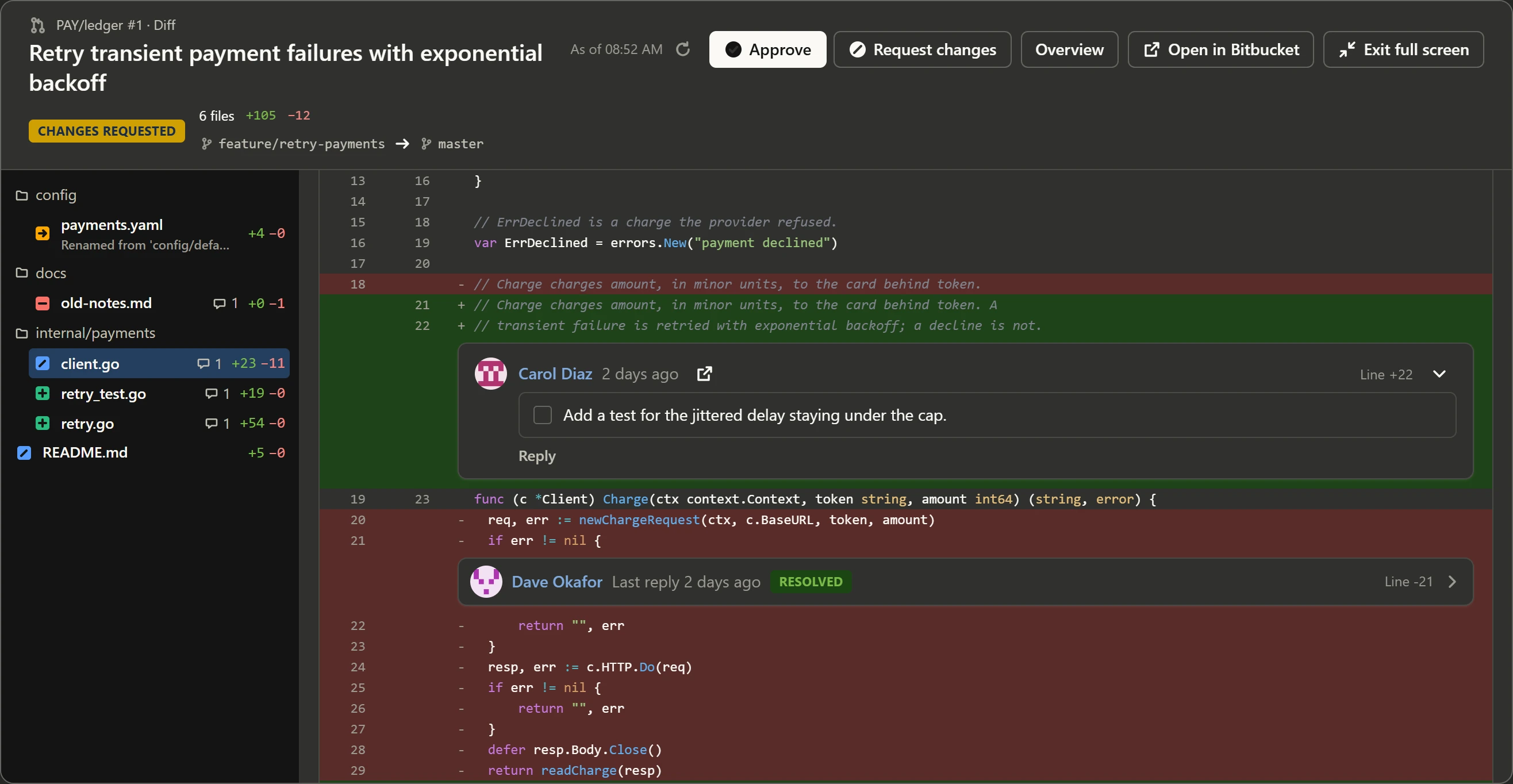
Diff opens the pull request's diff as Bitbucket's diff page has it: the file tree, and beside it one file at a time, the code highlighted and each comment on the line Bitbucket draws it on, a resolved one folded to a line. Select lines to add them to the chat, to ask about them, or to comment on them. A file too large to carry is named, with a link to its diff in Bitbucket. Back returns to where you were.
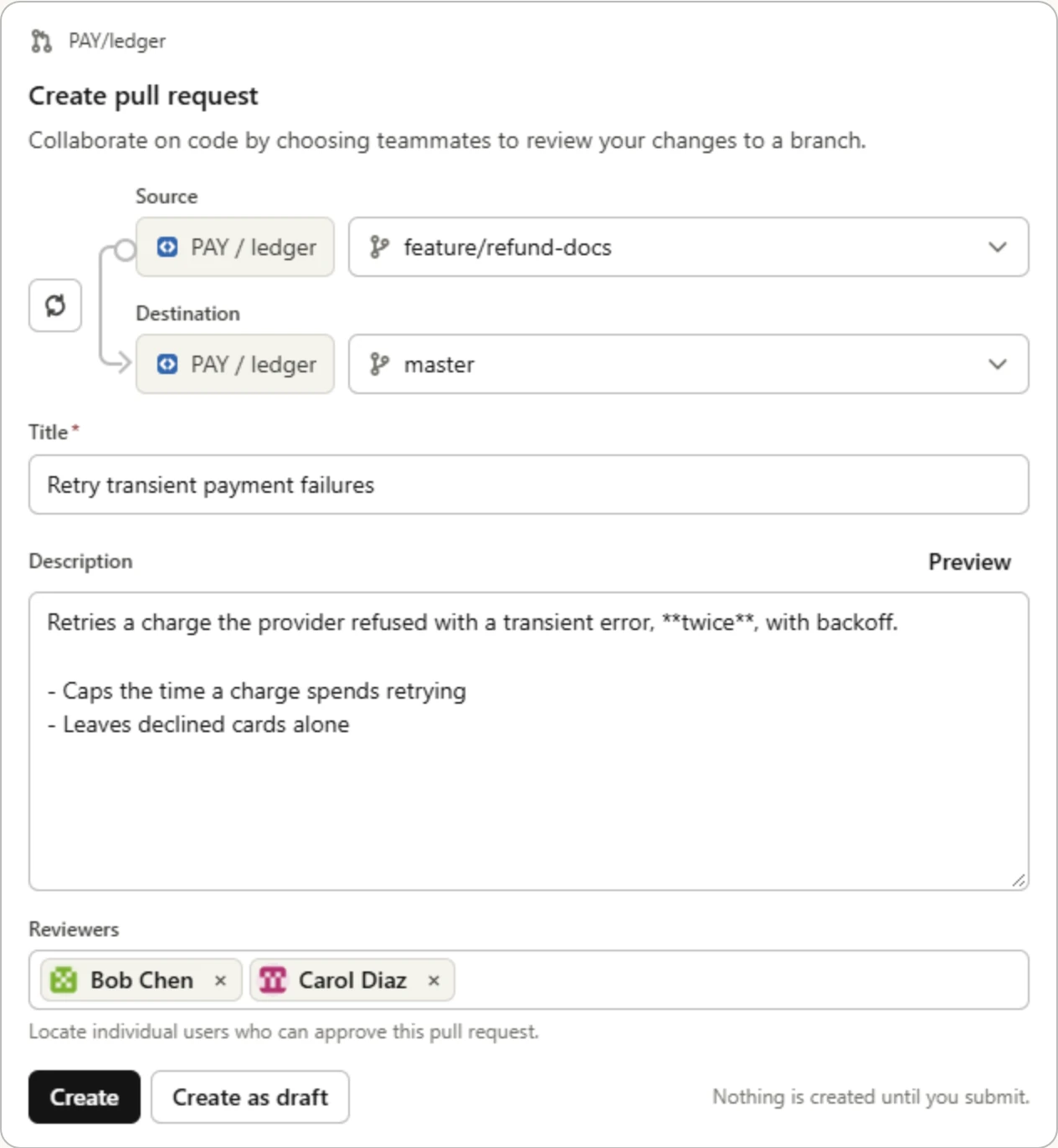
Ask for a pull request to be opened and the agent opens it. Be particular about its description or reviewers, or ask to see the draft first, and it hands you the draft as a form that works like Bitbucket's create page: the branches, picked from the repository's and swapped with one click; the title and description it wrote; the reviewers it suggests, with the default reviewers and code owners filled in as Bitbucket fills them in, and offered back if you remove them. Find more reviewers by name, and create it, or create it as a draft; nothing is created until you do. An existing pull request's title, description and draft state are edited the same way.
- A view carries what it draws. It renders again when you come back to the conversation, even without bb running, and it says when it was read.
- While a view is on screen, it keeps itself current: a build that finishes or
a new comment appears in place, and the model is told. It asks bb every 15
seconds while a build runs, less often the longer nothing changes, and not at
all off screen. A changed diff is offered rather than swapped in while you
read it.
--exclude refresh_viewkeeps views as they were drawn. - A count is Bitbucket's count of the whole, and a view that lists fewer says so. A failed build or a request for changes is never behind a click.
- Code is highlighted as far as bb gets before a deadline, and the rest drawn
plain. Of a Svelte, ERB, PHTML, Go HTML or Jinja template only the markup is
highlighted: the lexers for the code inside cannot be stopped midway, and a
crafted file keeps one busy for seconds.
--highlight-templateshighlights that code too, and no view waits for it. - A link opens in Bitbucket, in your browser, through the client; a client that will not open links shows you the address to copy. A button, such as Reply or Approve, calls a tool, as the agent does.
- bb reads everything a view shows, avatars included, with its own credentials: the client never contacts Bitbucket.
What a tool returns
A tool answers as if the client had nothing but MCP: no file system, no shell
and no bb. What a model needs comes back as text or as an image, converted on
the server, and never as a command to run, a path to open or a link to follow
(ADR-094).
get_file_content shows what that means for a file:
| The file | What comes back |
|---|---|
| Text | A window of numbered lines; start_line and line_count choose it, and each answer gives the start_line of the next |
| Word, PowerPoint, Excel | The text extracted from it, in the same windows: paragraphs and table rows, slides in order with their notes, sheets row by row |
| Zip, jar, tar, tar.gz, tar.bz2 | A listing of its entries, in the same windows |
| PNG, JPEG, GIF, WebP, BMP, TIFF | The image, or a TIFF's first page: as a PNG or JPEG when clients do not take its format, turned upright when its metadata says it was stored turned, and scaled down when it is larger than clients take, with a note saying which |
| Audio, video | The file itself beside a description when it is small, and the description alone when not |
| PDF, anything else | A description of its type and size, with its page in Bitbucket for a person to open |
Driving the CLI directly
An agent that runs commands should pass --json and read the envelope rather
than the human output, and consult --describe for a command's schema before
guessing at flags. Machine Mode and Diagnostics
has the envelope, the error kinds and the exit codes.
Installing the skill
The skill is a SKILL.md that teaches a shell-driving agent the command
surface: target resolution, the flags that matter, and the shapes commands
return. bb carries it embedded, so installing it needs no network and no
checkout of this repository:
bb ai skill install
That writes .agents/skills/bb/SKILL.md, which most agents read, and
.claude/skills/bb/SKILL.md, which Claude Code reads instead, alongside the
project. --global writes both under your home directory instead, for every
project of yours. bb ai skill remove deletes the files it wrote.
Scoop installs the skill with --global when it installs bb, and removes it
with bb. Homebrew and the .deb and .rpm packages only remind you to run
the command. They install for every user of the machine, and no one place
reaches every user's agents: the agents that read skills machine-wide each read
a directory of their own.
Where an agent reads a directory of its own, print the skill and redirect it
there; Cline, for one, reads ~/.cline/skills:
mkdir -p ~/.cline/skills/bb
bb ai skill show > ~/.cline/skills/bb/SKILL.md
Re-run bb ai skill install after upgrading bb. Both subcommands print the
copy compiled into the binary you just ran, so the skill and the command surface
cannot disagree, and bb doctor reports an installed copy that an earlier bb
wrote. The same skill is published through the open agent skills
ecosystem for machines where bb is not installed yet, but that copy is a
snapshot taken at release time and can describe a different version
(ADR-040):
npx skills add vriesdemichael/bitbucket-data-center-cli
llms.txt
llms.txt is a setup guide written for an agent to work through in
order: install, authenticate, then enable either the skill or the MCP server. It
ends with the machine output contract and links onward. It is not a summary of
the product or a substitute for the command reference.
Point an agent at it when the task is getting bb working. Once bb runs, the
agent's sources are the skill or the MCP tool catalogue for what to call,
--help and --describe for the exact surface, and these pages for behaviour.
- Published
llms.txt: llms.txt - Versioned docs home: Home
- Installation and Quickstart: Installation and Quickstart
- Command Reference: All Commands
- Machine-readable schemas: JSON Schemas
- AI skill for agents: SKILL.md on GitHub
Which source answers which question
| Question | Source |
|---|---|
How do I get bb working at all? |
llms.txt |
| What can I call, and how do I drive it? | The skill, or bb ai mcp tools |
| What exactly does this command take? | bb <command> --help, and All Commands |
| What shape does it return? | bb <command> --describe, and JSON Schemas |
| Why does it behave that way? | Advanced Topics and the ADRs |
| It failed and I need to know why | Troubleshooting, and Machine Mode and Diagnostics |